You film every session.
Now see what's in it.
See where you gain and lose time, compare your laps, and know exactly what to work on - no data logger, no sensors, just your footage and lap times.
Free during beta
“This tells me straight away where to work on next time.”
- Tyler, competitive series racer, TeamSport Crawley
See what you did differently.
Compare any two laps side by side - within a session, across sessions, or between drivers. Watch in real-time, slow-mo, or time-adjusted so you see the same corner at the same time. Just pick the laps - the videos are created for you.
● Works at any track - inline sector delta needs a supported track
Real-time side-by-side - your PB from two different sessions, compared lap to lap
Two drivers compared - time-adjusted and slow-mo, same corner at the same time
“Actually very useful to see the difference in my steering inputs in the downstairs hairpin and the entry into the S bend.”
On outdoor venues, GPS unlocks more.
With a GPS-capable camera at an outdoor circuit, you get a race-mode comparison against your best lap on a real satellite map, plus a corner-by-corner coaching breakdown showing exactly where time is still available.
● Outdoor venues only - GPS required
Race mode - your current lap vs your best on a satellite map, with live gap and per-sector deltas
Corner-by-corner coaching - on-screen callouts as you reach each turn, showing time still available and which lap set the demo best
See where you're fast and where you're not.
Every lap split into sectors. Instantly see which parts of the track cost you time and which are already strong.
● Works at any supported indoor or outdoor venue
Watch for karts in front changing at the joins between sectors.
Theoretical Best Lap - your fastest possible time combining each of your best sectors
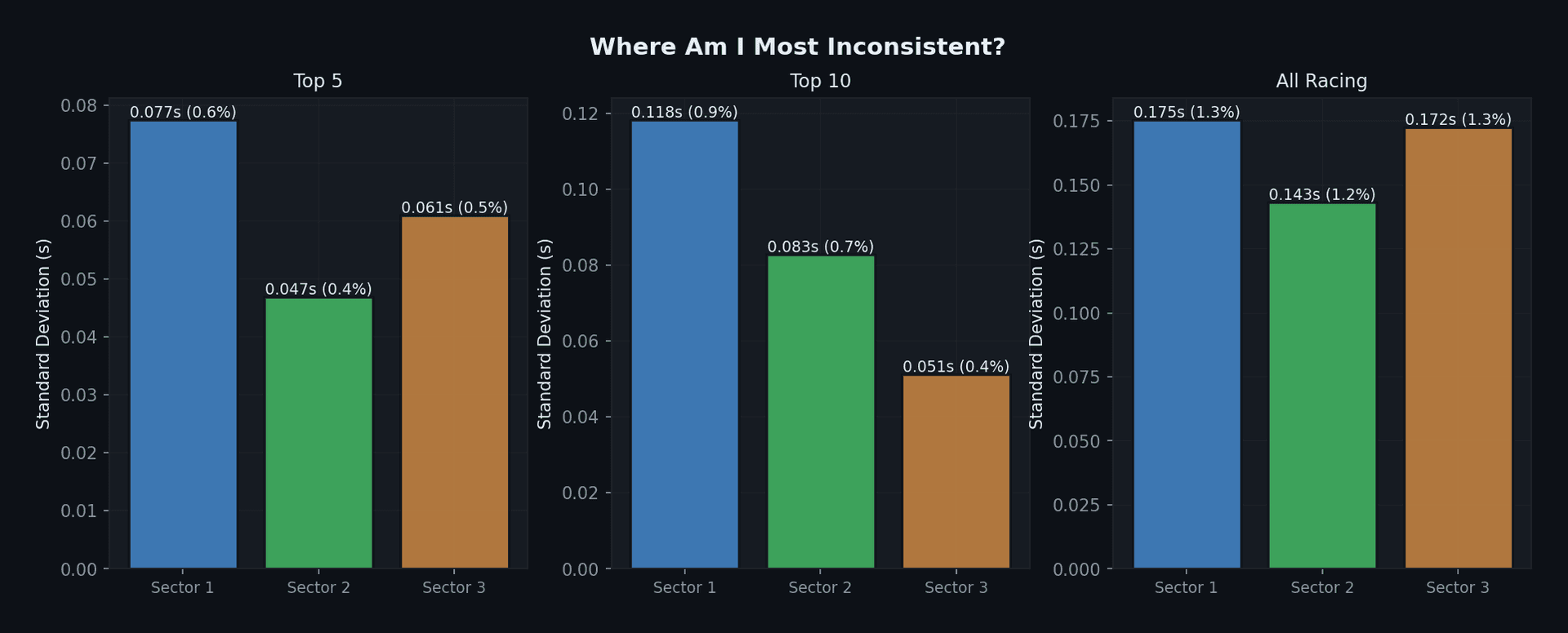
Consistency - which sectors cost you the most time
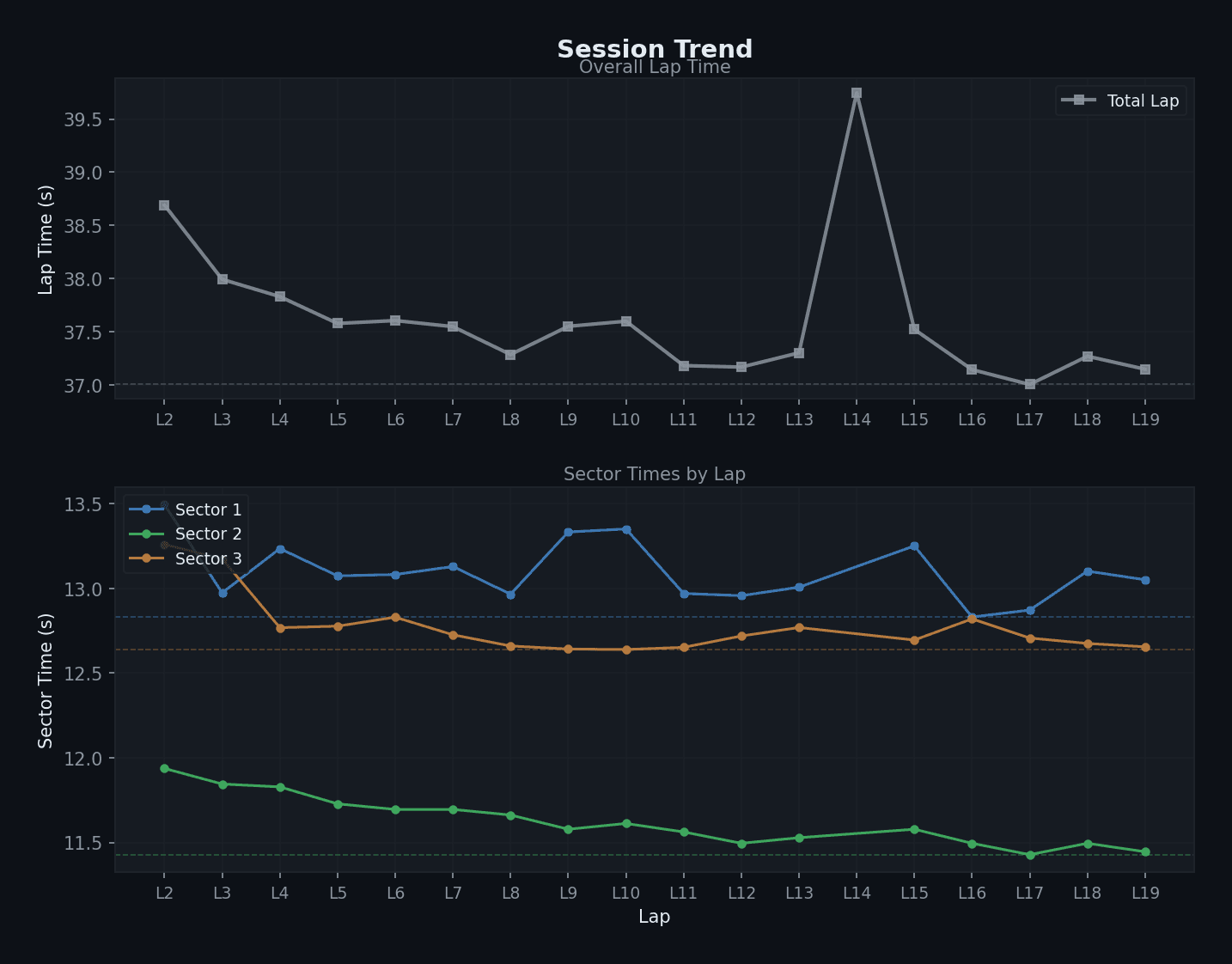
Session Trend - getting faster or slower through the session, by sector
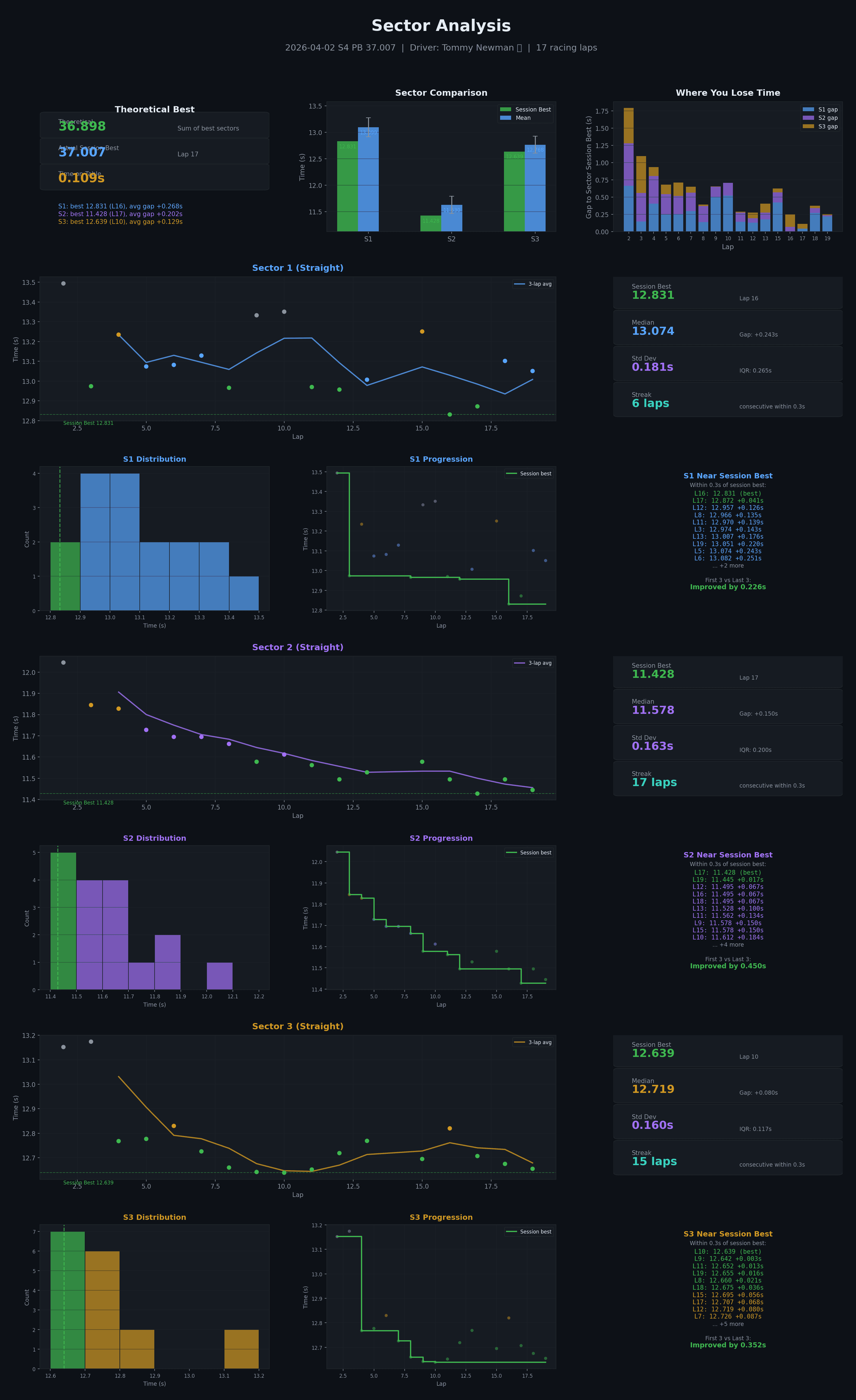
Sector Analysis - distributions, lap-by-lap progression, and how consistently you hit your best sector times
“Splitting up the track into sectors has really helped. I can see which corners I am most consistent at and where I am not.”
How you compare.
See how you stack up against the rest of the field across multiple sessions - rankings, head-to-head comparisons, and a virtual race.
● Works at any track
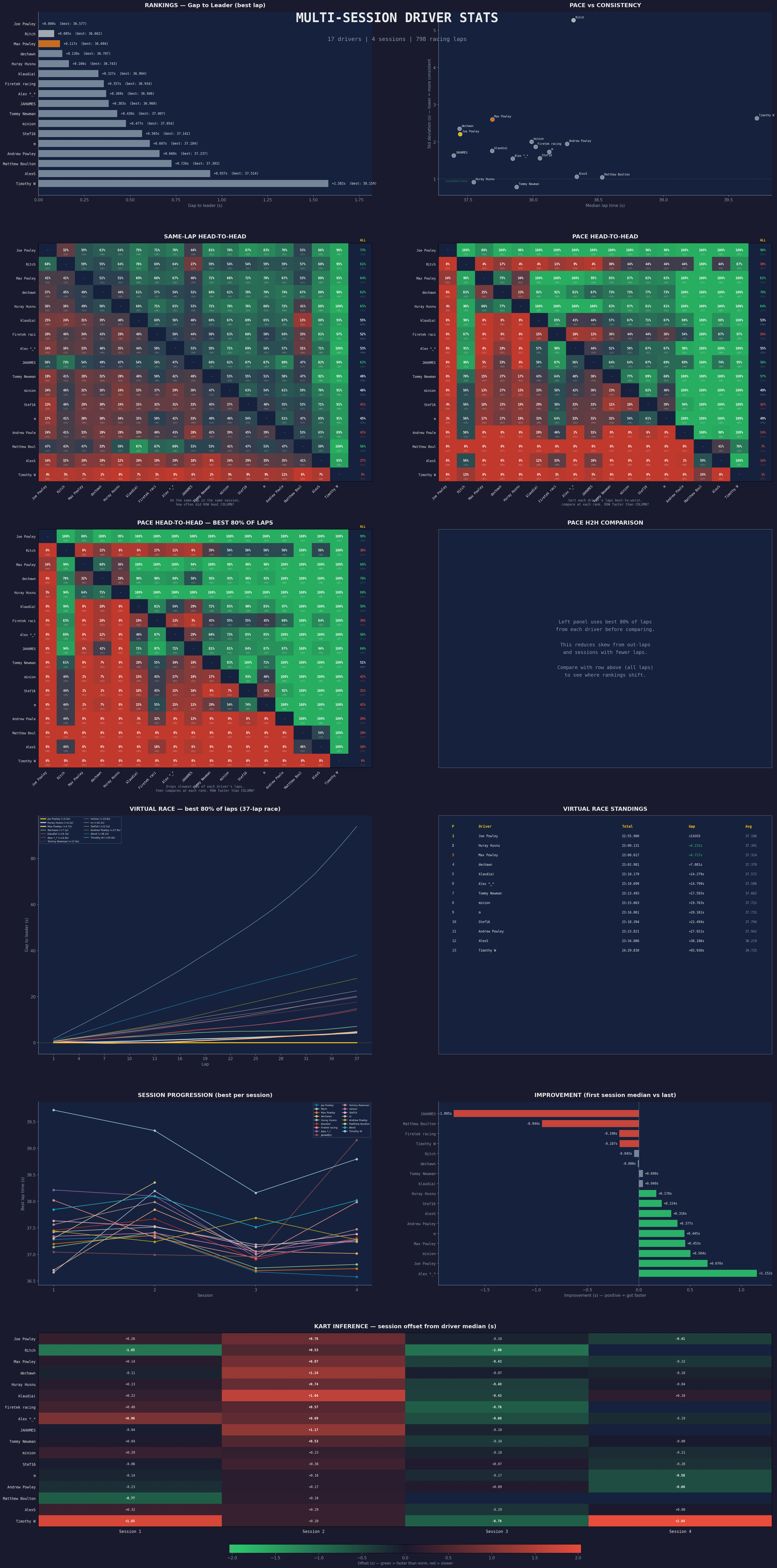
Session Insights - rankings, head-to-head grids, virtual race, and pace trends at a glance
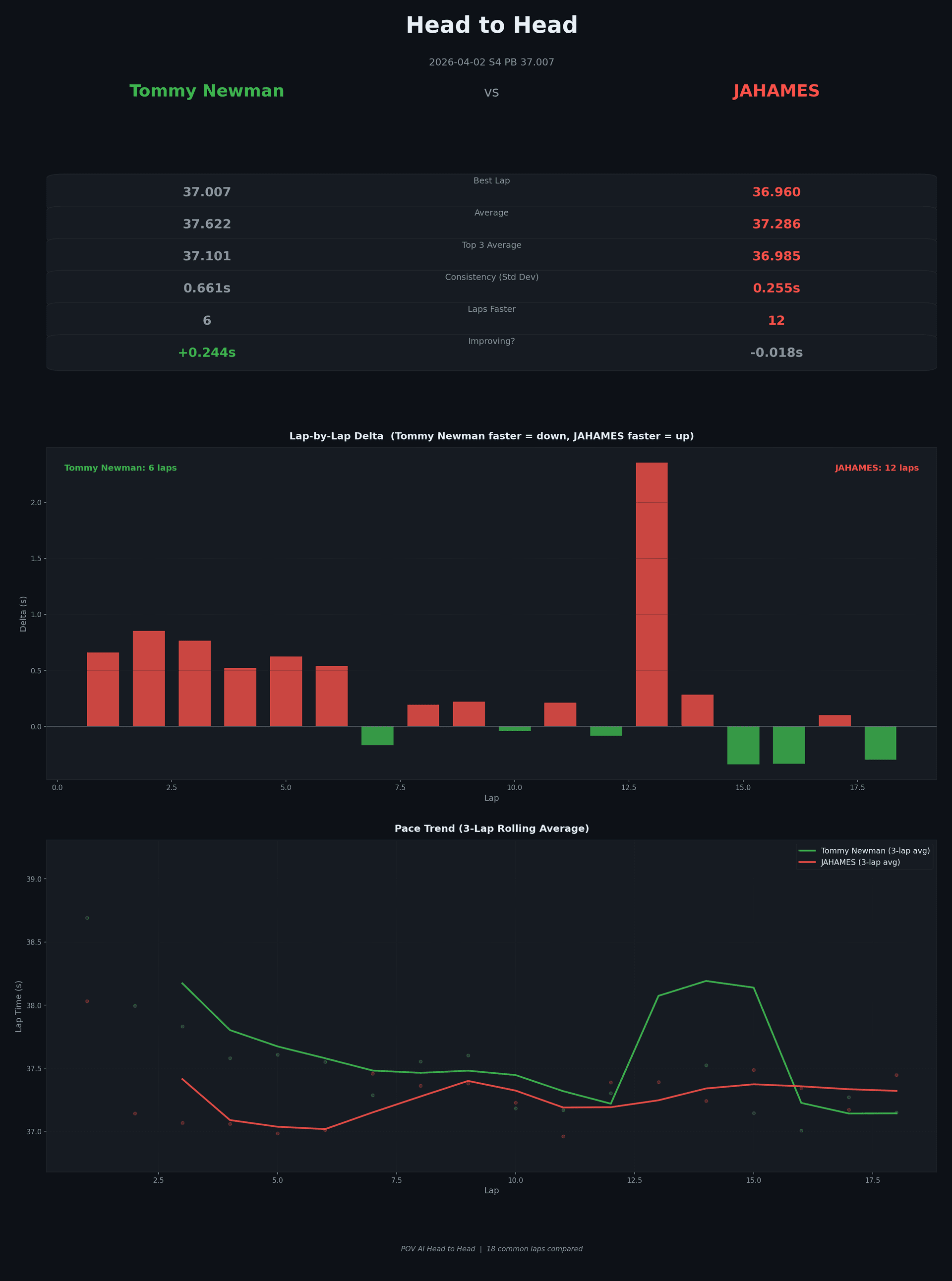
Head-to-head - you vs another driver, lap by lap delta and pace trend
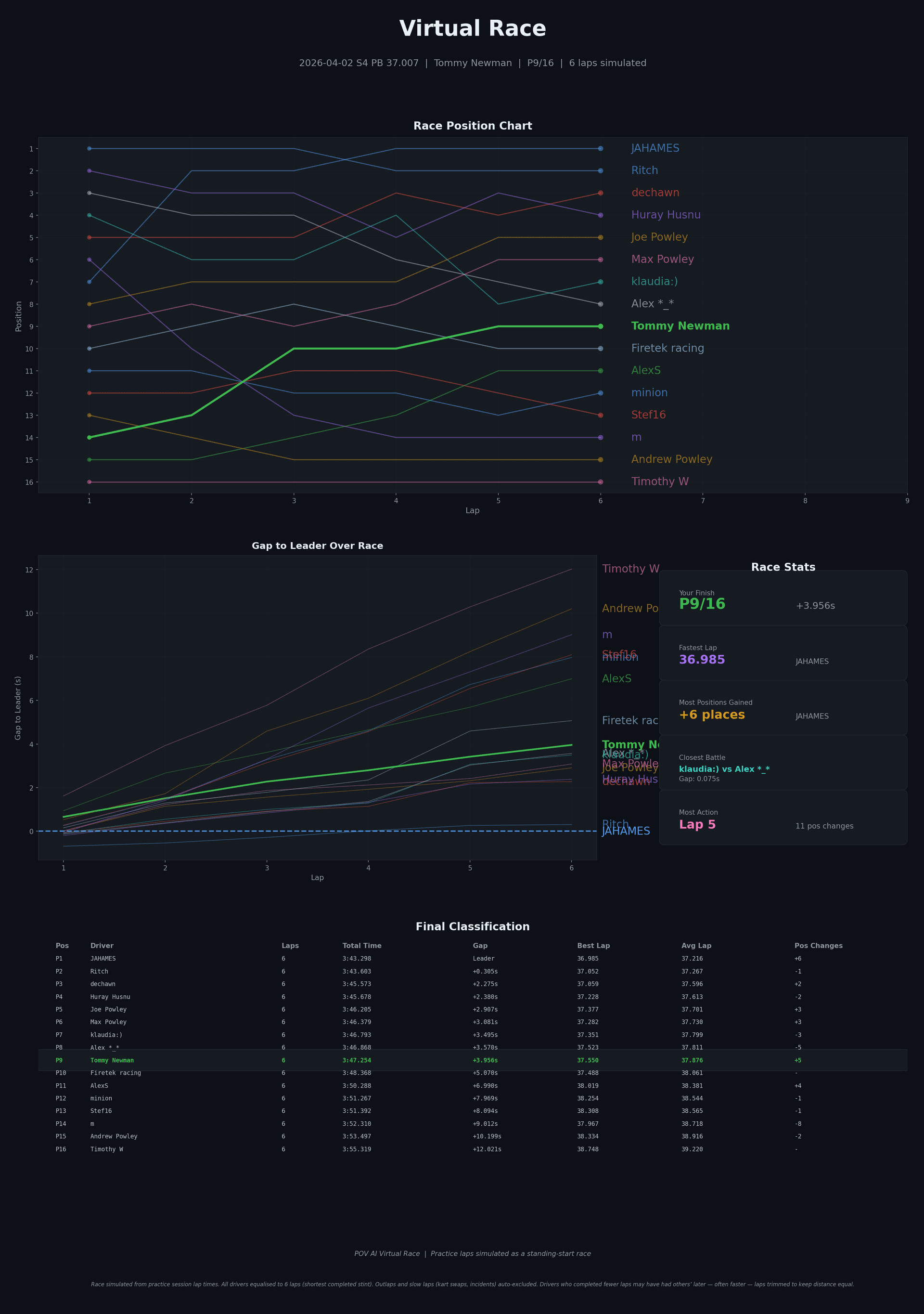
Virtual Race - who would win over a full race distance based on real pace
“I love that you can see just from consistency who can beat you in a race - and who your competition really is.”
“This level of analysis will make Amanze feel like a Formula 1 driver”
- Chidi, parent of junior karter Amanze, Mitcham
The moments that matter.
Overtakes, battles, and your best laps - detected automatically, ready to watch or share.
● Works at any track (no per-track setup needed)
Highlight reel - overtakes and battles auto-detected, competitors labelled on screen
Social share-ready video - best lap with timing overlay, formatted for Reels
Want your next session analysed?
We're in early beta. Join the waitlist and we'll be in touch. Early sign-ups get first access.
Common questions.
What tracks does Keval work on?
Keval works at any track for highlights, lap comparisons, and field comparisons. Sector analysis (and the inline sector delta on comparison videos) currently requires a short setup per track - so far it's live at three indoor TeamSport venues and one outdoor circuit in the UK, with more being added. Outdoor venues with a GPS-capable camera additionally unlock the race-mode satellite view and corner-by-corner GPS coaching. Tell us where you race when you sign up - tracks with more interest get added sooner, so feel free to share with anyone you race with.
What camera do I need?
Any forward-facing helmet or kart-mounted camera. GoPro, DJI, or even a £30 action camera from Amazon. Keval supports MP4, MOV and AVI video files.
Do I need to edit or compress my video first?
No. Keval handles multi-part recordings automatically and only analyses the racing sections of your footage. Videos are compressed in your browser before upload, so even multi-GB files transfer in minutes - not hours - without losing analysis quality.
What do I need to provide?
Your onboard video and your lap times from the session - the email or screenshot from the venue.
How are sectors determined?
Automatically from your video. No hardware, no beacons, no GPS - just your footage.
Will I have to pay?
Not during the beta - it's free. We're still working out the pricing for after; we'll be transparent about it well before anything changes.
What's included in the beta?
Everything you see on this page, and more. We'll select a small group of beta testers from the waitlist for early access. Wider rollout to follow.
What happens after I sign up?
Everyone who signs up will hear from us. We'll select a small group of testers for early analysis; others will get updates as access opens up.
What's coming.
More tracks
Sector analysis is being added at new venues based on demand. Tell us where you race when you sign up.
Voice notes
Speak while you drive and get a transcription alongside your analysis - useful for capturing what you noticed in the moment. Works best when your speech is audible over engine and wind noise.
In-camera markers
Cover the camera lens to mark a moment - once, twice or three times to signal different technique changes (e.g. trying a new braking point or line). See the difference in your data either side of each marker.
Have a feature you'd love to see? Tell us when you sign up - we build based on what you tell us.